Friday, 6 February 2015

Monitor deployments New user interface

In Spring 14 release Salesforce released new user interface to monitor deployments of metadata –API based deployments (1.e Ant deployment/Force.com IDE only, we cannot track change set deployment status here). This new user interface is very good to monitor the status or progress of the deployments. The deployment status will be automatically updated no need to refresh the screen to know the updated status of the deployments. In this new user interface we can see which component is in progress and we can see the status in graphical representation.
Using this new user interface, you can troubleshoot problems for a failed deployment by inspecting the returned errors and test failures, or you can find out about a long-running Apex test, among other things. In addition to this this new user interface lists queued deployments waiting for execution and deployments that have completed in the last 30 days.
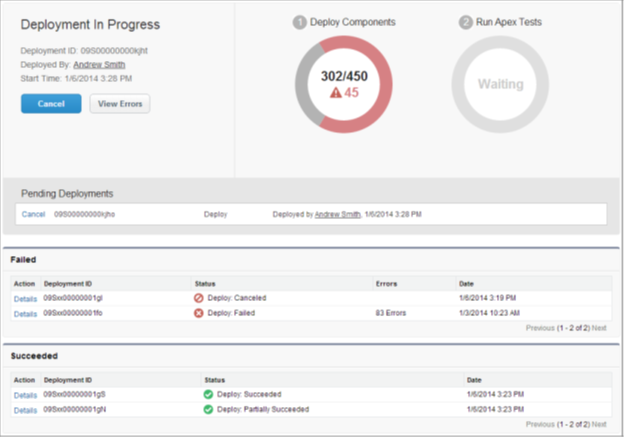
Below image shows the new UI of monitoring deployment page in Salesforce.
User Interface
For the current deployment (in progress deployment) it shows Deployment ID, Deployed By and Start Time. Now we can find Deploy components status and Run apex status. And we can see two different Lists of status, those are failed list of deployments and Succeeded list of deployments. Also we can find next queued deployments in this new deployment user interface.
Canceling a deployment: We can cancel the deployment while it’s in progress or in the queue by clicking cancel button next to the deployment. The deployment then has the status Cancel Requested until the deployment is completely canceled. A canceled deployment is listed in the failed section.
Completed Deployments: We can find the completed deployments in failed or succeeded sections depends on their status.Deployments that have finished but failed, and deployments that were canceled are listed in the failed section. No changes were committed to the organization for these deployments because files were missing, components had errors, tests failed, or the deployment was canceled.

Workbench Salesforce – Using Workbench

How can we use workbench salesforce? What we can do by using workbench salesforce?
In this post we will see about below concepts on workbench Salesforce.
1. How can we find information about Sobjects, Components & session information?
2. How to write SOQL & SOSL queries?
3. How to perform DML operation like Insert, Update, Upsert, Delete & Undelete oprations?
4. How can we perform Migrations like retrieve & Deploy?
5.  Executing Apex, ReST API quires & meta data API process status?
Finding information about Sobjects, Components & Session info
To find this information, login to workbench and go to info tab, you will get 3 options. See the below image for reference.
Workbench Salesforce 1
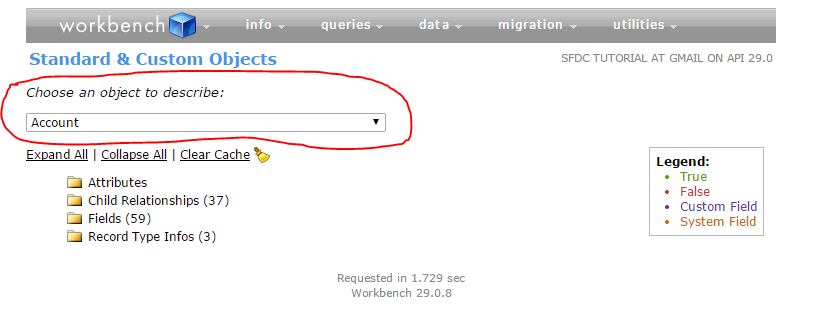
 Click on standard & custom objects to know about Sobjects information.
Select the object you are looking for in Choose an object to describe section. Tou will get the information about object like Attributes, Child relationships, fields..etc..
Workbench Salesforce3
Click on Metadata types & Components to know about components and click session to know about session information.
Writing SOQL & SOSL in workbench
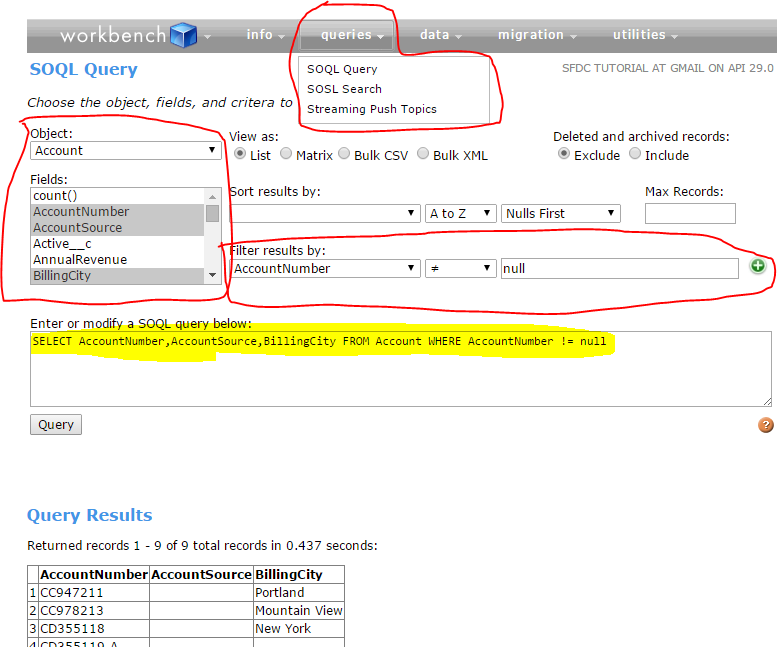
To execute SOQL or SOSL queries, go to queries tab & click on query type you want to execute and select the object, fields you want to query and also you can filter results by using filter result by section. Query will automatically come based on your selection. If you are expert in SOSL, you can directly write query. See the below screen to understand SOQL query in workbench.
Workbench Salesforce 4
 In the same way, we can write SOSL queries also.
By using Data tab, we can perform DML operations like insert, update, upser & delete operation. By using migrations tab, we can retrieve & deploy meta data. By using utilities tab execute apex & REST API queries.

Wednesday, 4 February 2015

Salesforce Scheduling an Exam


All proctored salesforce.com certification exams can be scheduled as an onsite or online proctored exam.
Onsite Proctored

Salesforce.com offers a global network of Kryterion sponsored testing centers. To locate the center nearest you visit 
http://kryteriononline.com/host_locations. Testing centers set their own schedules for when salesforce.com certification exams are offered, so availability can vary greatly among testing centers. Typically, exam registration is required at least 24-72 hours in advance; however, we recommend that you register one week in advance to ensure your preferred date and time is available.

For additional information about taking an exam at an onsite testing center, visit:
http://certification.force.com/pkb/articles/Public_KB/Onsite-Proctoring-Completing-Your-Exam-at-a-Testing-Center.
Online Proctored

Online proctoring allows you to take salesforce.com certification exams remotely from your own computer. The exams will be monitored by a proctor through a webcam. Online proctored exams are offered daily, excluding major U.S. holidays and exam system down-time. Advance registration is not required for online proctoring; you can register and launch an exam on the same day; however, if you are completing an exam through online proctoring for the first time, please allow extra time to prepare your computer.

Before scheduling an online proctored exam, it is strongly recommended that you review all of the necessary requirements and the test taking policies here:
http://certification.force.com/pkb/articles/Public_KB/Online-Proctoring-Completing-Your-Exam-Remotely.

Registering for an Exam

Follow the below steps to register for a salesforce.com certification exam.  You can also check exam availability by following these registration steps.
 
  1. Log in to Webassessor at www.webassessor.com/salesforce. If you do not already have a test taker profile in Webassessor, you will need to create one.
  2. Click Register for an Exam.
  3. Locate the exam you wish to schedule and expand the section to view the delivery options. You can choose to register for the exam as onsite proctored or online proctored. Click the Register button for the delivery method you prefer.
  4. If you selected the onsite proctored exam:
    • Select a testing center.
    • Select the date and time you would like to take the exam; read the Reschedule and Cancellation Policy, select the acknowledgement checkbox.
  5. If you selected the online proctored exam:
    • Select the date and time you would like to take the exam; read the Reschedule and Cancellation Policy, select the acknowledgement checkbox.
    • All online proctored exams are automatically adjusted to the time zone of the location you inputted in your Webassessor profile details.
  6. Click Select.
  7. Review the exam and scheduling details for accuracy, click Checkout.
  8. Enter your payment type. You can enter a voucher/coupon code and/or credit card.
  9. Click Submit.
  10. You will see a purchase confirmation screen. Click Done.
  11. An email confirming your purchase and registration will be sent to you.

Salesforce Exam Online_Test-Taker-Guide-January-2015

Salesforce.com Exam Online Proctoring – Completing Your Exam Remotely

Details
Online proctoring allows you to take salesforce.com certification exams remotely from your own computer. Online proctored exams are delivered through Kryterion’s Sentinel Secure software which allows the exam to be monitored by a proctor through a webcam. Before scheduling an online proctored exam, please review all requirements and documents provided below. 

For general information about scheduling an exam, visit:http://certification.force.com/pkb/articles/Public_KB/Scheduling-an-Exam. 

Online Proctoring Process

Online proctored exams are delivered through Kryterion’s Sentinel Secure software. You will be required to download the Sentinel Secure software and create a biometric profile to validate your identity before your scheduled exam time. Additionally, online proctoring requires an external, stand-alone webcam; internal built-in webcams are not accepted.

To ensure a successful attempt of your exam, you must review all requirements for online proctoring before scheduling an exam. For complete instructions on setting up your computer, creating your biometric profile, and launching an exam, please download the appropriate guide for your operating system.

Windows Operating System – Online Proctoring Guide:
http://certification.salesforce.com/OnlineProctoringGuide-WindowsOperatingSystem.pdf

Macintosh Operating System – Online Proctoring Guide:
http://certification.salesforce.com/OnlineProctoringGuide-MacintoshOperatingSystem.pdf

Please visit http://www.kryteriononline.com/support for the following resources to help you prepare for your exam: 
  • Video tutorials for online proctoring and webcam requirements
  • Test your equipment
  • Online chat with Kryterion online proctoring technical support
If you are interested in purchasing a webcam from Kryterion, visit:http://shopping.netsuite.com/kryterion. 

Online Proctoring Policies

When completing a certification exam, all test takers must be in compliance with theCertification Program Agreement. For more information, please visit:http://certification.force.com/pkb/articles/Public_KB/User-Agreement. Additionally, you must follow all instructions provided by the proctor. Failure to comply with the program agreement, proctor instructions, or the requirements below may result in exam suspension and/or disciplinary action.

In order to provide a secure testing environment, your testing area must meet the following requirements: 
  • The testing area must be well lit, quiet, and free from any activity other than testing. It must also be clutter free and contain only the approved equipment described in the Online Proctoring Guide (See above).
  • The webcam must provide a view of the computer, keyboard, mouse, your hands and full face, and a minimum view of 12 inches (30 centimeters) on either side of the keyboard.
The following are not permitted during your online proctored exam: 
  • Access to personal belongings, material, or devices is not permitted.
  • External monitors, projector screens, or recording devices are not permitted in the testing area.
  • No other individuals allowed in the testing area.
  • Eating, drinking, and smoking are not permitted.
  • Head phones or a head piece that blocks any portion of the face are not permitted.
  • Leaving the testing area is not permitted.
  • Disconnecting the camera at any time during the testing session is not permitted.
Need additional help? 

For assistance with online proctoring technical requirements, contact Kryterion Technical Support: 
For assistance with general online proctoring inquiries or scheduling, open a case with Salesforce.com Certification.

Tuesday, 3 February 2015

Salesforce Winter '14 Release Exam Questions and Answers


1. What is a capability of Salesforce Identity
A. Require users to have a High Assurance session to edit, modify or delete selected objects
B. Require users to have a High Assurance session to access Reports, Dashboards, and connected Apps
C. Require users to use a time-based token when logging into Salesforce outside the trusted IP ranges.
D. Require users to enter a time-based token in addition to login credentials when accessing Salesforce
Answers
B,D
2. What is a capability of historical trending?
A. Historical trending reports can be filtered to show only records that have changed.
B. Historical trending can track number, formula and checkbox fields.
C. Historical trending reports show changed values in different colors
D. Historical trending can be enabled for all standard and custom objects.
Answers
A,C
3. How can an administrator or developer restrict users from seeing other users in the organization?
A. Set the OWD for the User object to Private
B. Enable the "Restrict Access to users" permission for all users
C. Disable manual sharing for the User object
D. Create a sharing rule to prevent users from seeing other users.
Answers
A
4. What is a capability of embedded analytics?
A. Reports charts can be used to show data from tabular, summary and joined reports.
B. An embedded chart can be filtered to show data for the record on which it appears.
C. Report charts can be embedded on page layouts for standard and custom objects
D. An embedded chart can be used to share report data from a personal folder
Answers
B,C
5. What is the capability of Site.com? choose 3 answer
A. Multilingual Language Support
B. HTML page imports are supported
C. View the site in different resolutions using live mode
D. Export Style sheet from site.com
E. Using workflow rules to automate site publishing
Answers
A, B, C
6. What is a true statement regarding Salesforce Knowledge
A. Users can search and view articles without a knowledge User license
B. Users can create and publish articles without the Manage Articles permission.
C. Users can provide feedback on the Chatter feed of a draft article.
D. Users can add and remove supported languages in the knowledge base
Answers
A,C
7. What is a capability of Entitlement Management?
A. Create recurring milestone within an entitlement process.
B. Execute a flow when a milestone is met or violated.
C. Define criteria-based sharing rules for an entitlement process.
D. View the countdown time to an active milestone's Target Date.
Answers
A,D
8. How can an administrator customize Salesforce Console?
A. Add the Home tab to the navigation tab.
B. Add related lists to the Interaction log Layout.
C. Add the Most Recent Tabs component to the footer.
D. Add a dashboard component to the Highlights Panel.
Answers
A,C
9. What is a capability of Collaborative Forecasts?
A. View the forecast separately for each product family
B. Reflect split revenue amounts in the forecast.
C. Display the forecast by territory when using territory management
D. View the forecast for specific periods in a custom fiscal year.
Answers
A,B
10. What is a capability of chatter Answers
Chose 2 answers
A. Users can save drafts of questions an answers to be posted later.
B. Users can post private replies to an Idea on the Ideas tab
C. Users can reply to a question directly from an email notification
D. Users can view Questions and Ideas activity on Chatter profiles
Answers
C,D
11. How can an administrator customize Live Agent
A. Add images, animations, and custom agent
B. Add pre-recorded voice greetings and music to chat invitations.
C. Configure automated chat invitations to route chats to agents with specific skills
D. Configure agent settings to accept chats from the Q&A tab.
Answers
A,C
12. How can the Salesforce Console for Sales be customized?
A. Developers can create custom console components to display sales information.
B. Sales reps can create personal customizations to override which tabs are sub tabs.
C. Administrators can add custom buttons to the navigation tab and the highlights panel.
D. Administrators can define primary tabs and sub tabs to show related records on one screen.
Answers
C,D
User account Freezing

Freezing :-

It means temporarily suspend a user account, So He/She not able to access your Salesforce org once  they left the organization and you need more time to deactivate user account.

Explanation : -

We cant deactivate users account immediately once user left the organization. Some time we have requirement to deactivate user but that user may be selected in workflow email alert, custom hierarchy field or some where else in this case you need to perform some extra steps, may be it take  few minutes to few hours but it may possible user can access your Salesforce org even he/she left the organization. So from Winter 14 release salesforce come up with an feature called as “Freeze” users.

Freezing user accounts doesn’t make their user licenses available for use in your organization. You must deactivate user accounts to make their user licenses available.

Steps to freeze :-

To freeze user’s account follow the below instruction :-
  1. Click on Name | Setup | Administration Setup |Manage Users | Users.
  2. Click the name of the user whose account you want to freeze.
  3. Click Freeze button beside login.
Only System Administrator or Users with “Manage Users” Permission can perform Freezing.

Enabling Bulk API option in Data Loader


The Bulk API is optimized to load or delete a large number of records asynchronously. It is faster than the SOAP-based API due to parallel processing and fewer network round-trips. By default, Data Loader uses the SOAP-based API to process records.
To configure Data Loader to use the Bulk API for inserting, updating, upserting, deleting, and hard deleting records:

  1. Start Data Loader by choosing Start | Programs | salesforce.com | Data Loader | Data Loader.
  2. Choose Settings | Settings.
  3. Select the Use Bulk API option.
  4. Click OK.

Note: You can also select the Enable serial mode for Bulk API option. Processing in parallel can cause database contention. When this is severe, the load may fail. Using serial mode guarantees that batches are processed one at a time. Note that using this option may significantly increase the processing time for a load.

Convert String to Date format


string str='7/28/2013';     /*Format must be mm/dd/yyyy
Date dt=Date.parse(str);

orstring str='2013/7/28';     /*Format must be yyyy/mm/dd
Date dt=Date.valueof(str);

Salesforce’s URL Structure


This post was inspired by Mike Schinkel’s “URL Structure”.
Finally found the structure to delete a record in SF, adding it below. Eoin
Here’s a quick introduction to understand the structure of all the URLs in Salesforce:

Instances

Salesforce’s organizations reside on multiple instances, to find out what instance you’re on, once you logged into Salesforce, have a look at the address bar; you’ll notice the URL starts with something like:
  • ssl - North America #0 (aka na0)
  • na1 - North America #1
  • na2 - North America #2
  • na3 - North America #3-
  • na4 - North America #4
  • na5 - North America #5
  • emea - Europe, Middle East, Africa
  • ap - Asia, Pacific
  • tapp0 - Sandbox #0
  • tapp1 - Sandbox #1
https://xyz.salesforce.com where xyz is the name of the instance your organization is on.

Objects’ specific URLs

Every Salesforce’s object has it’s specific URL, here are listed the links to the standard objects:
Objects URLs Objects’ code
Accounts https://[instance].salesforce.com/001/o 001
Contacts https://[instance].salesforce.com/003/o 003
Leads https://[instance].salesforce.com/00Q/o 00Q
Cases https://[instance].salesforce.com/500/o 500
Solutions https://[instance].salesforce.com/501/o 501
Reports https://[instance].salesforce.com/00O/o 00O
Opportunities https://[instance].salesforce.com/006/o 006
Campaigns https://[instance].salesforce.com/701/o 701
Products https://[instance].salesforce.com/01t/o 01t

Basic action URLs

Use the following URLs to perform the listed operations on a specific object. Note this is fundamental to then understand how to create internal custom links.
Object’s overview page
https://[instance].salesforce.com/[object]/o
Create a new record
https://[instance].salesforce.com/[object]/e?retURL=/[object_code]/o
Edit a record
https://[instance].salesforce.com/[object]/[recordID]/e?retURL=[recordID]
Clone a record
https://[instance].salesforce.com/[object]/[recordID]/e?retURL=[recordID]&clone=1
Delete a record
https://[instance].salesforce.com/setup/own/deleteredirect.jsp?delID=[recordID]
where:
  • [instance] is the instance’s name your organization resides on;
  • [object] is the object’s code;
  • [recordID] is the ID of the record itself.

Spring 14 maintenance Release Development exam Questions

How can an administrator customize reporting for users?
Choose 2 answers

A. Remove footer information from exported reports.
B. Hide report types from all users.
C. Limit the number of reports a single user can create.
D. Enable historical trending reports for campaigns.
Ans: A,B

What option is available to a user when building a dashboard?
Choose 2 answers

A. Group and name dashboard filter values.
B. Add up to 50 components to a single dashboard.
C. Display fractions as percentages in a table component.
D. Display data from multiple reports in a single component.

Ans: A,C
What is a capability of the Data Import Wizard?
Choose 2 answers

A. Example import values are displayed to help with field mapping.
B. Records can be imported for all standard and custom objects.
C. An import file can be dragged into the wizard for uploading.
D. Field mappings can be saved and used in later imports.
Ans: A,C

How can an administrator control access to the Salesforce1 mobile application?
Choose 2 answers

A. Create and assign a mobile configuration.
B. Assign the Mobile User a standard profile.
C. Enforce IP restrictions for mobile devices.
D. Define which users have login access.
Ans: C,D

What is a capability of Salesforce Orders?
Choose 2 answers

A. Account and contract fields on an order can be modified.
B. Reduction orders can be created to process product returns.
C. An order can be associated with multiple price books.
D. Orders can be created directly from an account or contract.
Ans: B,D

Summer 14 maintenance Release Development exam Questions


 Answers are in Bold and red

1)What can an administrator do with reports and dashboards?
Choose 2 answers

A. Mass delete dashboards that are not scheduled to automatically refresh.
B. Mass delete reports not used in dashboards or analytic snapshots.
C. Include roll-up summary fields in historical trending.
D. Enable historical trending for forecasting items.

2)Which report type allows a user to drill down to a report from a dashboard in the Salesforce1 mobile app?

Choose 2 answers

A. Summary
B. Tabular
C. Joined
D. Matrix

3)What can a community manager do in the Community Engagement Console?
Choose 2 answers

A. View community performance dashboards.
B. Assign community moderators.
C. Add and remove community members.
D. Set up reputation levels for community members.

4)What is true about the enhancements to user management permissions?
Choose 2 answers

A. User management permissions can be found under Object Permissions.
B. User management permissions can be assigned using a profile or permission set.
C. Users with the View All Users permission can log in as any user.
D. Users can be granted a subset of the capabilities of the Manage Users permission.

5)What is Capability of User Sharing?

A.Administators can control the visibility of user records with Organization-wide default settings.
B.The OWD settings for user obj defaults to public read/write
C.
D.

Winter 15 maintenance Release Development exam Questions


1) A tabular report can be used as the source report for which Dashboard component?
 A. Stacked Bar Chart
B. Metric
C. Table
D. Gauge
2) Universal Containers uses a custom object to track open job positions and would like to send an automatic email to the hiring manager when a position is moved to the closed stage. What can be used to accomplish this?
A. Workflow rule
B. Escalation rule
C. Cross-object formula
D. Auto-response rule
3) What is a capability of Advanced Setup Search?            Choose 2 answers
 A. See which object an item is associated with in the Setup search results.
B. Enter search criteria using wildcard characters, such as an asterisk (*).
C. Search for individual Setup items, such as workflow rules, by name.
D. Bookmark specific items listed in the Setup search results.
4) What is a feature of unlisted groups in Chatter?           Choose 2 answers
 A. Users can ask for permission to join unlisted groups.
B. Users with the Modify All Data permission can access unlisted groups.
C. Users with the Manage Unlisted Groups permission can access unlisted groups.
D. Members of an unlisted group can view the group in list views and search results.
5) Users at Universal Containers often need to update the Status and Amount of an opportunity using the Salesforce1 mobile application. How can this common update be expedited?              Choose 2 answers
 A. Create a custom action on the Opportunity object using a Visualforce page.
B. Create a global update action on the Chatter feed.
C. Create an object-specific update action on the Opportunity object.

D. Create a mobile-only page layout for the Opportunity object.